Audit Log
Audit Log
InvenTree keeps an audit log (change history) of the changes made to key database models. Each time a supported item is created, updated or deleted, an entry is written to the audit log, recording:
- When the change was made
- Who made the change (the user account associated with the request)
- What was changed (the item, and the old and new values of each modified field)
- How the change was made (the source of the change, e.g. an API request or a background task)
The audit log is useful for tracing the history of an item, understanding why a value is what it is, and identifying which user made a particular change.
Version Information
Audit history is not recorded prior to InvenTree version 1.7.0. Any changes made before upgrading to version 1.7.0 will not appear in the audit log.
How Auditing Works
Auditing in InvenTree is implemented using the django-auditlog library. Changes are captured at the database model level, so they are recorded regardless of how the change was made - whether via the user interface, the REST API, the Python bindings, or a plugin.
Some notes on what is recorded:
- Field changes - For updates, only the fields which have actually changed are recorded. Saving an item without changing any values does not create an audit entry.
- Parent linkage - Many audited models are linked to a parent item. For example, a purchase order line item is linked to its purchase order, and a BOM item is linked to its assembly part. Changes to child items are displayed in the history of the parent item.
- Files - For file fields (such as attachments), only the filename is recorded, not the file contents.
- Request information - Each entry records the user who made the change, along with the remote IP address and a correlation ID which links together all changes made in a single request. The username is retained, even if the user account is later deleted.
- Background tasks - Changes made by background tasks are recorded against the name of the task which made the change.
- System settings - Changes to global settings are recorded (and are only visible to staff users). Internal settings which are updated automatically by the system are not recorded, and the values of protected settings are never stored.
- Audit settings - Changes to the audit log settings are always recorded, even if the audit log is disabled. This ensures that disabling the audit log (or adjusting the retention period) cannot go unnoticed.
What Is Not Recorded
To keep the audit log focused and performant, some changes are intentionally not recorded:
- Derived fields - Internal or calculated fields (such as tree structure fields, cached pricing values and metadata) are excluded.
- Data import - Changes made using the data import tool are not recorded.
- Unsupported models - Only the models listed below are audited.
Audited Models
The following models are currently audited. Where a model has a parent, changes to that model are also displayed in the history of the parent item.
| Category | Model | Model Type | Parent | Notes |
|---|---|---|---|---|
| Build | Build Order | build.build |
||
| Common | Attachment | common.attachment |
Audit entries for an attachment are included in the history of the linked object. | |
| Common | Custom Unit | common.customunit |
||
| Common | InvenTree Setting | common.inventreesetting |
Only the following fields are recorded: key, value |
|
| Common | Parameter | common.parameter |
Audit entries for a parameter are included in the history of the linked object. | |
| Common | Parameter Template | common.parametertemplate |
||
| Common | Project Code | common.projectcode |
||
| Company | Address | company.address |
Company | |
| Company | Company | company.company |
||
| Company | Contact | company.contact |
Company | |
| Company | Manufacturer Part | company.manufacturerpart |
Company | |
| Company | Supplier Part | company.supplierpart |
Company | |
| Company | Supplier Price Break | company.supplierpricebreak |
Supplier Part | |
| Order | Purchase Order | order.purchaseorder |
||
| Order | Purchase Order Extra Line | order.purchaseorderextraline |
Purchase Order | |
| Order | Purchase Order Line Item | order.purchaseorderlineitem |
Purchase Order | |
| Order | Return Order | order.returnorder |
||
| Order | Return Order Extra Line | order.returnorderextraline |
Return Order | |
| Order | Return Order Line Item | order.returnorderlineitem |
Return Order | |
| Order | Sales Order | order.salesorder |
||
| Order | Sales Order Extra Line | order.salesorderextraline |
Sales Order | |
| Order | Sales Order Line Item | order.salesorderlineitem |
Sales Order | |
| Order | Sales Order Shipment | order.salesordershipment |
Sales Order | |
| Order | Transfer Order | order.transferorder |
||
| Order | Transfer Order Line Item | order.transferorderlineitem |
Transfer Order | |
| Part | BOM Item | part.bomitem |
Part | |
| Part | BOM Item Substitute | part.bomitemsubstitute |
Audit entries for a substitute are included in the history of the assembly. | |
| Part | Part | part.part |
||
| Part | Part Category | part.partcategory |
||
| Pricing | Part Internal Price Break | pricing.partinternalpricebreak |
Part | |
| Pricing | Part Sale Price Break | pricing.partsellpricebreak |
Part | |
| Pricing | Part pricing | pricing.partpricing |
Part | Only the following fields are recorded: override_max, override_max_currency, override_min, override_min_currency |
| Stock | Stock Item | stock.stockitem |
Part |
Events
Some models record named events in the audit log, in addition to field changes. An event describes what happened to an item (for example, an operation which affects multiple fields, or multiple items), and may include:
- Event type - The type of event (displayed in place of the action in the audit log table)
- Notes - Optional notes provided by the user when the event was recorded
- Deltas - Additional information about the event, such as quantities or references to related objects. References to related objects are recorded as they were at the time of the event.
An event may be recorded even if no fields of the item were changed.
For example, stock operations (such as moving, counting or shipping stock) are recorded as stock tracking events against each affected stock item.
Disabling the Audit Log
Events are recorded in the audit log, and are subject to the same settings as all other audit entries. If the audit log is disabled, events are not recorded - this includes all stock tracking history.
Viewing Change History
Detail Pages
When enabled, a History panel is displayed on the detail page for supported items (such as parts, companies and orders). This panel shows all changes made to the item, including changes made to any linked child items.

For example, the history panel for a purchase order shows changes made to the order itself, as well as changes to its line items:

The History panel is only displayed if all of the following conditions are met:
- The audit log is enabled (via the
Enable Audit Logsystem setting) - The user has enabled the Show Change History user setting
The entries displayed in the History panel are filtered by the permissions of the user (see Permissions below).

Admin Center
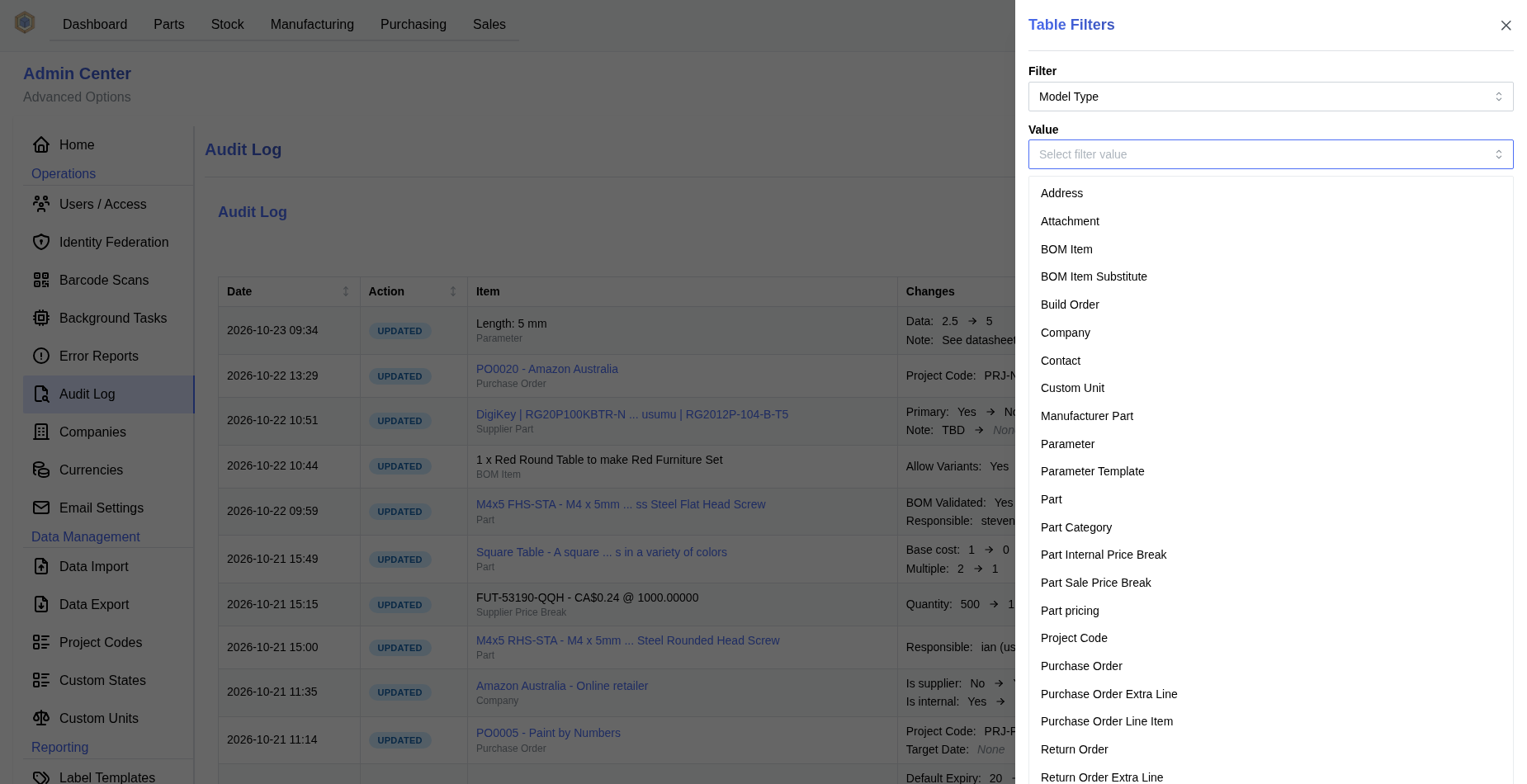
Staff users can view the complete audit log in the Audit Log panel of the Admin Center. This panel shows all recorded changes across all audited models, and provides access to the audit log settings.

The audit log table can be filtered by action, user, date range and model type:
Permissions
Access to the audit log is restricted:
- Audit entries are filtered by the user's role permissions. A user can only view audit entries for models which they have permission to view.
- Some models (e.g. attachments and parameters) require the user to also have permission to view the parent model.
- The history of some models (e.g. global settings) is only available to staff users.
- The remote IP address associated with each entry is only visible to staff users.
- References to related objects (recorded against events) are hidden if the user does not have permission to view the related model.
- The Audit Log panel in the Admin Center is only available to staff users.
Data Retention
By default, audit log entries are kept indefinitely. Over time, the audit log may grow to a significant size. InvenTree can be configured to automatically delete old audit log entries, via a scheduled task which runs daily.
When deleting old entries, the Retain Audit Log Summary setting can be used to keep a minimal history for each item - the creation entry, and the most recent change - while still removing older intermediate entries.
Settings
The following settings are available to control the behavior of the audit log, and can be adjusted in the Audit Log panel of the Admin Center:

System Settings
| Name | Description | Default | Units |
|---|---|---|---|
Enable Audit Log |
Record a history of changes made to supported models | True |
|
Delete Old Audit Log Entries |
Delete audit log entries older than the specified number of days | False |
|
Audit Log Deletion Interval |
Audit log entries will be deleted after specified number of days | 365 |
days |
Retain Audit Log Summary |
When deleting old audit log entries, always keep the creation entry and the most recent entry for each item | True |
User Settings
| Name | Description | Default | Units |
|---|---|---|---|
Show Change History |
Display the change history (audit log) panel on detail pages | False |