Stock Disassembly
Stock Disassembly
A stock item of an assembly part can be disassembled back into its component parts, based on the Bill of Materials (BOM) for that part. This is the reverse of building an assembly - instead of consuming components to create an assembled item, the assembled item is broken back down into its constituent components.
This is useful in a number of scenarios, for example:
- An assembly is being reworked or scrapped, and the still-usable components need to be returned to stock
- A supplier ships a "bundled" or "kit" product as a single line item, which needs to be split apart into its individual components before the parts can be used or sold separately (see below)
- Correcting an assembly which was built or received in error
Disassembly is only available for a stock item whose part is marked as an assembly, and requires that the part has at least one BOM line item defined.
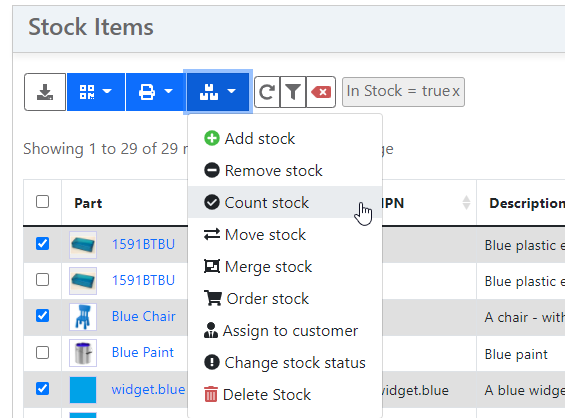
To disassemble a stock item, navigate to the stock item detail page and select the Disassemble option from the actions menu. This requires that the user has the Stock: Add permission, and that the stock item is currently in stock.
Disassembly Form
The disassembly form is pre-populated with one line per BOM line item defined for the part, based on the quantity of assemblies being disassembled. Any line item marked as consumable (whether the BOM line itself or its underlying part is marked consumable), or which points to a virtual part, is excluded, as these components are not expected to be tracked as physical stock. This exclusion is enforced by the API - such a BOM line cannot be submitted for disassembly, even if referenced directly.
For each line, the following values may be adjusted:
| Field | Description |
|---|---|
| Quantity | The total quantity of the component part to generate. This is automatically scaled as the top-level Quantity field is changed, unless the user has manually edited it |
| Location | An optional destination location for the generated stock item. If not specified, the component is placed in the same location as the disassembled item (or the default location specified at the top of the form) |
| Status | An optional stock status to apply to the generated stock item. If not specified, the component is created with the default OK status |
| Unit Price | An optional purchase price to record against the generated stock item. If left blank, a price is calculated automatically (see below) |
A line item can be removed from the form entirely if that particular component is not required to be split out - for example, if it is being scrapped rather than returned to stock. A line cannot be removed if it has installed items associated with it (see below).
Quantity
Only the available quantity of a stock item can be disassembled. A serialized stock item does not have an adjustable quantity - since it represents a single physical unit, it must always be disassembled in its entirety.
The original stock item is never deleted as a result of disassembly - its quantity is reduced by the disassembled amount, in order to preserve traceability. If a stock item is disassembled down to a zero quantity, it is retained in the database (in an unavailable state) rather than removed, even if the item has the Delete on Deplete flag set. A serialized item cannot be reduced to a zero quantity, so in this case the original item is instead marked with a Destroyed status.
Accounting for Installed Items
If the stock item being disassembled has other stock items installed within it (for example, tracked components that were installed during a build order), these installed items must be accounted for during disassembly:
- Each installed item is matched against a BOM line item, based on the component part (including any substitute or variant parts allowed for that line)
- Matched installed items are uninstalled directly, rather than being discarded and re-created - this preserves the original stock item, including its own tracking history, batch code, and purchase price
- The quantity requested for the matching BOM line is reduced by the quantity already covered by the installed item(s). A new stock item is only created for any remaining quantity - if the installed items fully cover the required quantity, no new stock item is created for that line
- Any installed item which does not match one of the selected BOM lines is still uninstalled (it cannot be left "installed" inside a smaller or non-existent parent), but its quantity is not subtracted from any line
Because installed items cannot be partially accounted for, a stock item with any installed items must be disassembled in its entirety - a partial disassembly (disassembling less than the full available quantity) is rejected if any items are currently installed.
The disassembly form displays a count of installed items against each matching BOM line, and lists any "leftover" installed items (which do not match a BOM line) in a separate warning panel.
Automatic Cost Allocation
If the original stock item has a recorded purchase price, and no explicit Unit Price has been entered for the generated lines, InvenTree attempts to automatically apportion that cost across the newly generated components:
- The total cost (unit purchase price × disassembled quantity) is split across the lines, weighted by the existing pricing data (average of minimum and maximum overall price) for each component part
- If pricing data is not available for every line, the cost is instead split evenly on a per-unit basis across all generated units
- Cost is only allocated across newly created stock items - any matched installed items retain their own existing purchase price, and are excluded from the cost split entirely
- If any line has an explicit Unit Price provided by the user, automatic cost allocation is skipped entirely, and prices are only applied where explicitly set
Traceability
Disassembling a stock item generates a full audit trail:
- A
Disassembled into componentsentry is added to the tracking history of the original stock item - Each newly created component stock item receives a
Created from disassemblytracking entry, referencing the original stock item - The batch code and source purchase order of the original stock item are copied directly to each generated component
- If the original stock item was generated by a build order, that build order cannot be directly copied to the new component (since the component was not actually built by that order) - instead, it is recorded as a reference within the
Created from disassemblytracking entry
Purchasing Bundled Items
Some suppliers only sell a group of components as a single bundled or "kit" product, rather than as individual purchasable line items. Such a bundle can be modelled as an assembly part, purchased and received as a single stock item, and later disassembled into its individual components - with purchase price and traceability data automatically apportioned across the generated components, as described above.
Refer to the Bundled Items documentation for a full description of how to set this up.
Enforced Limitations
The following limitations are enforced when disassembling a stock item:
- The part associated with the stock item must be marked as an assembly
- The stock item must currently be in stock - for example, it cannot be allocated to a sales order, installed in another assembly, or already fully consumed
- At least one BOM line item must be selected for disassembly
- The disassembly quantity cannot exceed the available quantity of the stock item
- A serialized stock item must be disassembled in its entirety (its quantity cannot be partially reduced)
- Each BOM line may only be referenced once per disassembly operation
- A selected BOM line must be a valid line item for the part associated with the stock item
- If the stock item has any installed items, it must be disassembled in its entirety